Monitoring and Logs
Logging
Each workload you deploy to your cluster, whether through Juno products or on your own will eventually run in a container.
For workloads within Juno, we provide you with the ability to view workload logs directly in the web console, as well as related Kubernetes events. Additionally, services that make up Juno can all be viewed in ArgoCD and their logs inspected within it. To get a quick overview, check out this guide
For workloads you run outside of Juno, you can use Kubernetes to inspect the logs.
Genesis Logs Console
Note
The logs console is restricted to members of the 'admin' user group.
Admins can read the logs for the services that make up their Orion deployment directly in Genesis, without dropping to
kubectl or opening ArgoCD. Click the logs icon at the bottom of the sidebar, alongside the
help links, to open the logs console.
The console opens over the page you are on, so you can keep working while it is open. It can be expanded to fill the window for reading longer output, and resized to keep more of the page behind it visible.
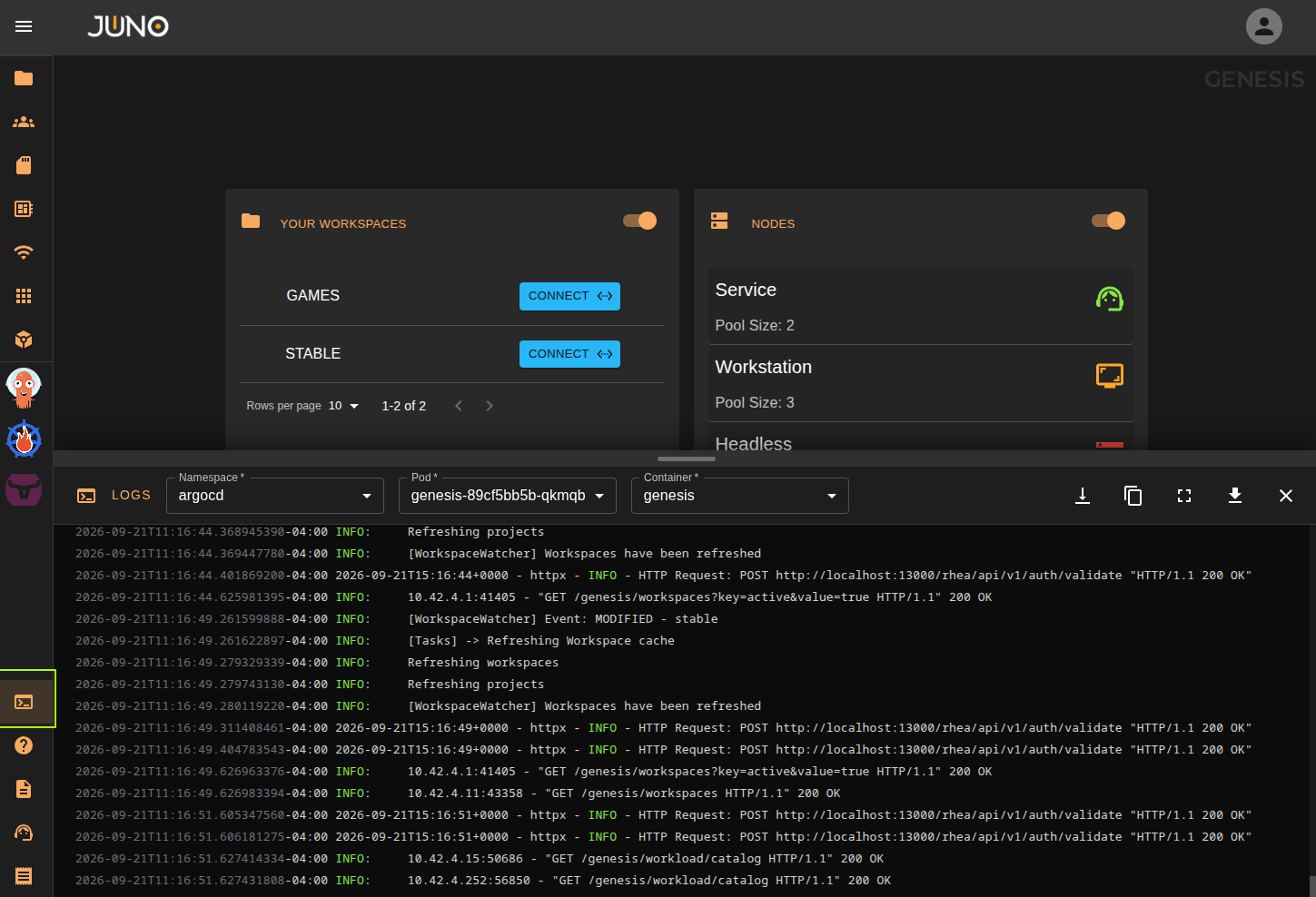
Cluster Services
The console lists the cluster level services deployed by the Genesis deployment chart. Select a service to view its container logs.
| Service | Logs shown |
|---|---|
| Genesis | Orion's central management component. |
| Terra | Plugin manager, including plugin source syncing and install activity. See the Terra documentation. |
| Titan | User management. See the User Management documentation. |
| Metrics Gatherer | Cluster metrics collection, including consumption license scrapes. See the Metrics Gatherer documentation. |
These are the same services listed under Service Settings on the settings page, so if you restart a service there you can watch it come back up from the logs console.
Workspace Services
The console also lets you select any of your workspaces and view the logs for that workspace's own services, Hubble and Kuiper. Each workspace is listed separately, so you can move between workspaces without changing what you are looking at in the rest of Genesis.
| Service | Logs shown |
|---|---|
| Hubble | The workspace's user facing portal. See the Hubble documentation. |
| Kuiper | The workspace's workload orchestration service, including workload launch and shutdown activity. |
Workspace must be active
Hubble and Kuiper only produce logs while the workspace is active. A hibernated workspace has its compute scaled down, so there is no running container to read logs from. See Activate/Hibernate.
Downloading and Copying Logs
The logs shown in the console can be downloaded to a file, or copied to your clipboard. Both actions act on the service you currently have selected.
When raising a support ticket, downloading the logs for the affected service and attaching them to the ticket is the quickest way to get us the information we need. See our Support documentation for details.
A container is simply a process that gets confined & contained by the runtime.
All of the logs it outputs are gathered and available via the Kubernetes api, using the kubectl logs command.
To inspect a workload not managed by Argo or Juno, you would look up the name of the pod and run kubectl logs -n <namespace> <pod name>
This is useful when troubleshooting ArgoCD itself.
Monitoring
To better operate your cluster in production, you can leverage a monitoring stack. It will be able to give you insight into performance of your cluster hardware, as well as deployed workloads.
We are working on integrating a full monitoring stack into Juno's Terra store, to provide you an opinionated, out-of-the-box install.
While that's on the way, the Kubernetes ecosystem provides plenty of options - though they do require some setup and each have a learning curve. For workloads outside of Juno, we recommend the kube-prometheus-stack as a good starting point.